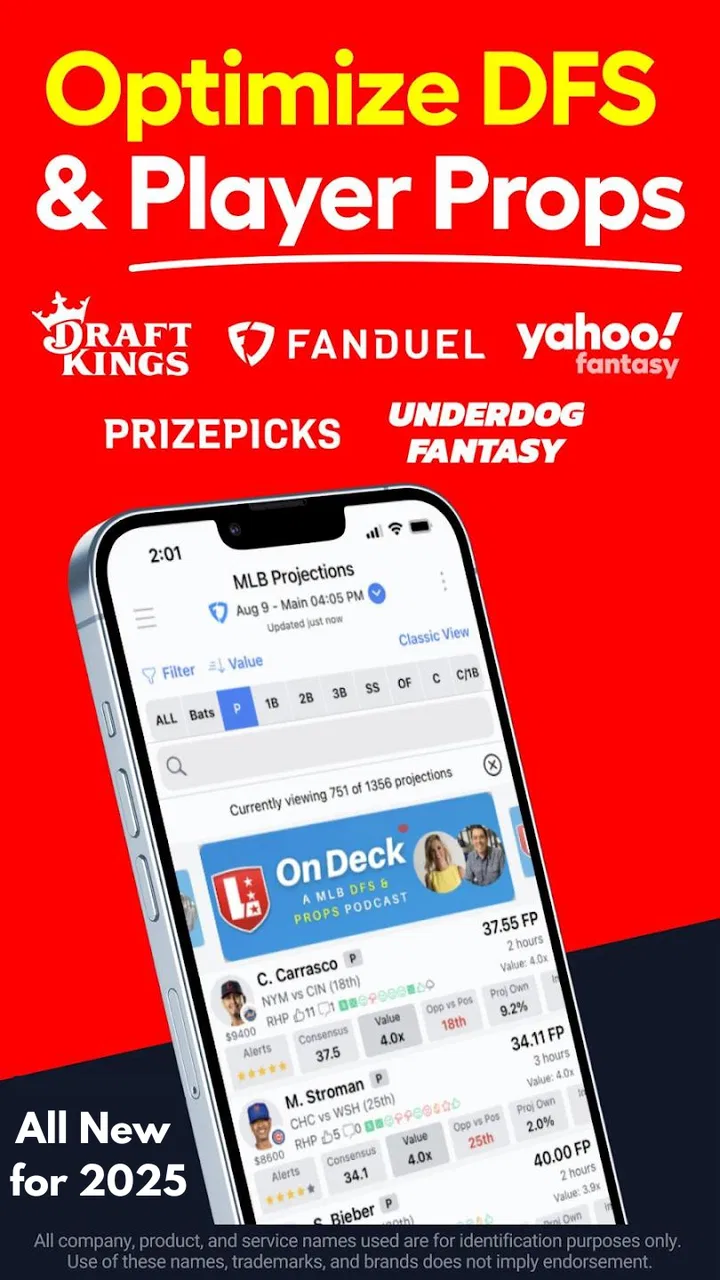
LineStar DFS & Props Optimizer
- 4.6
- Rating
- 10.00K
- Installs
- Free
- Price

 Analysis by App-foxy
I spend a lot of time comparing daily fantasy sports lineups, and LineStar DFS & Props Optimizer is designed for the part of that routine that usually becomes repetitive: turning player information into several usable entries without rebuilding every lineup by hand. It is a free sports app from BetFully, Inc., aimed at people who want more structure than a basic player list but do not necessarily want to manage the entire process from a desktop.
My first impression is that LineStar is best understood as a lineup-workbench rather than a complete fantasy experience. It does not replace the contest platform where entries are submitted, and it is not a general sports-news reader. Its value comes from helping me organize decisions, produce variations, and examine prop-bet ideas in one focused mobile tool. That distinction matters, because the app is useful when I already know what kind of contest I am entering and want to work faster.
How LineStar feels in its current form
The current release is version 3.7.2, and the app has been available since August 26, 2015. That long presence gives it a more established feel than a brand-new optimizer, while the current version suggests that BetFully, Inc. is still maintaining the product rather than leaving it untouched. I would not treat the version number alone as proof that every part of the experience is modern, but it does provide helpful context: this is a tool that has had time to develop around a specific fantasy-sports workflow.
You May Also Like

 Pandora - Music & Podcasts
Pandora’s Music Is Easy to Start, but Harder to Recover
Pandora’s strength is its low-effort path from a seed to a station. Its weak spot is how much confidence it asks you to place in connection, setup, and quiet recovery.

 AccuWeather: Weather Radar
AccuWeather Review: A Quick, Clear Forecast for Everyday Decisions
For everyday plans, the best forecast is the one you can understand quickly. AccuWeather makes rain timing, radar, and local conditions easy to act on, with a few trade-offs.

 Hill Climb Racing
Why Hill Climb Racing Still Turns Crashes Into One More Run
A tiny car, a bumpy hill and one more upgrade: Hill Climb Racing keeps resurfacing because its simple chaos makes every near-miss feel personal.

 AliExpress - Shopping App
AliExpress Makes Global Shopping Feel Personal, but Shoppers Bear the Risk
AliExpress turns a global marketplace into a pocket-sized discovery engine. Its reach is useful, its shopping loop compelling, and its trade-offs easy to miss.

 Lords Mobile: Kingdom Wars
Lords Mobile Is a Kingdom-Building Routine, Not a Quick Match
A case-by-case verdict on the building, battles, device demands, and social commitments that make Lords Mobile rewarding for some players and exhausting for others.

 PDF Scanner app - TapScanner
TapScanner Makes Paperwork Easier to Capture, Check, and Share
TapScanner makes scanning with a phone feel less like a rescue operation and more like a dependable step in getting work done. Its capture tools are useful, though not flawless.
More From Our News Desk
View All News


LineStar’s store summary points to three central jobs: optimizing more than 150 DFS lineups quickly, supplying advanced tools, and working with prop bets. In practice, that combination makes the app more interesting than a simple “pick players” utility. The important question is not whether it can produce many lineups, but whether those lineups reflect the strategy I actually want to use. An optimizer can save time while still producing poor results if I accept every suggestion without checking exposure, contest type, or late news.
The app has an average rating of 4.6 from roughly 1.2 thousand ratings, with about 182 written reviews, and it has passed 10 thousand installs. Those figures suggest a focused audience rather than a mass-market sports app. I read that as a strength and a warning: the product appears to serve a particular kind of fantasy player, but a beginner looking for a guided introduction may find the interface and terminology less welcoming than a mainstream fantasy app.
The workflow I found most practical
I would begin by treating LineStar as a planning layer. Before generating anything, I would decide whether I am building a small number of carefully considered entries or a broad group with controlled variation. That decision changes how useful the optimizer becomes. For a single entry, manual research may be quicker. For a larger group, the ability to create many lineups and then inspect the differences is where the app earns its place.
One useful habit is to create a core view of the slate before touching the optimizer. I look for the players I genuinely want included, the positions where I am uncertain, and the spots where a lineup could become too dependent on one game or one popular choice. Then I use the generated results as suggestions instead of final answers. This prevents the common mistake of allowing a fast tool to make every strategic decision.
The “150+” lineup capability is particularly relevant to users who enter larger pools, but the number should not become a target by itself. More lineups mean more review work if I do not set a clear purpose for them. I would rather generate a manageable batch, compare the construction patterns, and remove repetitive or uncomfortable combinations than fill every available slot simply because the app can do so.
The strongest use of LineStar is controlled speed, not blind automation. That is the difference between an optimizer that supports my judgment and one that encourages me to stop thinking. The app can reduce repetitive lineup construction, but it cannot know my bankroll limits, my preferred contest selection, or how much risk I am willing to accept unless I apply those decisions myself.
Props are useful, but they change the decision process
The prop-bet side gives LineStar a second purpose. Props require a different kind of attention from traditional lineup building because the question is usually whether a player reaches a particular outcome, not simply whether that player fits a salary structure. I would use this part of the app to organize possible angles and compare them with the broader slate, not as a substitute for checking current player status and the rules of the sportsbook or contest platform I use.
A practical workflow is to separate “interesting” from “actionable.” A player may look attractive in a prop view but still be a poor choice if playing time is uncertain, the matchup has changed, or the line no longer offers a reasonable price. LineStar can help me collect and examine possibilities, but the final decision still depends on information outside the optimizer. This is one of the app’s most important boundaries, especially for users who expect a recommendation to remain correct throughout a fast-moving game day.
I also like the idea of using props as a challenge to my lineup assumptions. If I am heavily relying on a particular player, checking related prop possibilities can reveal whether my expectation is consistent or contradictory. For example, if my lineup assumes a limited role but my prop selection assumes a major workload, I need to resolve that conflict before entering anything. That kind of cross-check is more valuable than simply generating another set of combinations.
What the evolution means for existing users
For someone who has used LineStar for years, the current version is likely more important as a continuation of a familiar workflow than as a reason to relearn fantasy sports. The product’s history since 2015 and its current 3.7.2 release point toward gradual product evolution rather than a completely different category of app. Existing users can reasonably approach it as a maintained tool for lineup and prop preparation, while still checking whether its current interface matches the way they personally build entries.
New users should expect a learning period. The app’s short store description is simply “LineStar,” while its longer summary assumes that terms such as DFS, lineups, optimization, and props already mean something to the reader. I would not recommend opening it five minutes before a contest and expecting instant confidence. A better approach is to explore it on a low-pressure slate, learn where the lineup controls and analysis tools fit into the process, and only then make it part of a regular routine.
One change that matters to existing users is not necessarily a visible feature but the need to keep personal processes current. As fantasy platforms adjust roster rules, scoring formats, and contest structures, an optimizer is only as useful as its fit with the contest I am entering. I would always verify the final lineup on the destination platform rather than assuming that a generated result transfers perfectly. That extra check is quick and protects against using a technically valid lineup in the wrong format.
The free entry point also makes experimentation easier. I can test whether the workflow suits me without paying an upfront purchase price. However, the app includes in-app purchases ranging from $9.99 to $239.99 per item. That is a significant range, so I would examine what I am unlocking and whether it solves a problem I actually have before spending money. Casual players may get enough value from the basic experience, while frequent users may consider advanced access only after proving that the app saves them meaningful time.
Where the app can create friction
The biggest limitation is the gap between producing lineups and producing good decisions. LineStar can make a large batch quickly, but quantity can hide weak assumptions. If I do not understand why a lineup was created, I may end up with entries that look different while relying on the same fragile idea. I would review player overlap, game concentration, and the role of the less obvious selections before treating any group as diversified.
Another limitation is that mobile optimization can feel cramped compared with a desktop spreadsheet or browser-based research setup. I can imagine using a phone for quick adjustments, but deeper comparison across many lineups may require patience. A desktop alternative may be better for users who want a large table, several research windows, and detailed manual notes open at the same time. LineStar’s advantage is portability; that does not automatically make it the best environment for every serious analysis session.
The app also is not the right choice for someone who wants a social fantasy community, live game viewing, or a simple pick-and-play experience. Its focus is preparation and construction. If I only enter an occasional contest and enjoy making one lineup myself, the optimizer may add complexity instead of removing it. Likewise, someone looking for guaranteed predictions should skip it. No lineup tool can eliminate uncertainty, and the app should not be treated as a promise of winnings.
Because the content rating is Everyone, the app is broadly accessible from an age-classification standpoint. That does not mean every fantasy-sports use case is suitable for every person. I would still approach paid contests and prop decisions carefully, set a firm entertainment budget, and avoid increasing stakes simply because the app makes it easier to create more entries. Convenience can quietly encourage overuse if I do not set limits in advance.
Three ways I would use it beyond the obvious
First, I would use LineStar as a disagreement detector. After generating a group, I would look for players or game environments that appear repeatedly. If the same assumptions dominate every lineup, I would ask whether that reflects genuine conviction or merely the optimizer’s preferred construction. This turns the output into a diagnostic tool: it shows me where my strategy is concentrated, even when the lineups appear varied at a glance.
Second, I would build a late-news routine around it rather than treating the first generated batch as permanent. I would create an initial group earlier in the day, note which positions are most sensitive to lineup announcements, and then revisit those areas when information changes. The benefit is not just speed; it is preserving a repeatable process. I am less likely to make a rushed replacement if I already know which parts of the lineup deserve attention.
Third, I would use prop analysis to test correlation instead of selecting props in isolation. When two choices depend on the same game script, I would decide whether that is intentional or accidental. Sometimes correlated expectations are exactly what I want; other times they make the overall plan too narrow. LineStar is most helpful here when I use it to expose relationships between decisions, not when I treat each suggested prop as an independent opportunity.
A fourth useful approach is to compare a manually built lineup with an optimized one under the same basic assumptions. If the optimizer produces something I would never consider, that does not automatically mean it is wrong. It may reveal a salary allocation or positional trade-off I overlooked. Conversely, if every optimized version ignores a player I strongly prefer, I can investigate whether my preference is supported by the slate or simply emotional attachment. That comparison helps me learn the tool without surrendering control to it.
Who should install it, and who should pass
I would recommend LineStar to an intermediate DFS player who already understands roster construction and wants a faster way to explore multiple entries. It is also a reasonable fit for someone who frequently switches between lineup building and prop evaluation and would rather keep those tasks in one sports-focused app. The free price makes it easy to test, and the wide lineup capacity gives high-volume users room to build a more deliberate portfolio.
I would be more cautious recommending it to a complete beginner. The app may help a new player understand lineup variation, but it does not remove the need to learn contest rules, scoring, salary mechanics, and responsible bankroll habits. A simpler fantasy platform with built-in explanations may be a better first step. Once the basics are comfortable, LineStar becomes easier to appreciate because its tools address real workflow problems instead of introducing unfamiliar terminology.
I would also skip it if my main priority is deep desktop research. A browser-based optimizer or spreadsheet may offer a clearer overview for someone who wants to compare extensive notes, projections, and contest structures side by side. LineStar makes more sense when mobility and rapid lineup generation matter. The right choice depends less on whether one tool is universally stronger and more on whether its screen and workflow match the way I make decisions.
What I would watch before relying on it
With version 3.7.2 as the current release, I would pay attention to how BetFully, Inc. handles future changes around contest compatibility, lineup controls, and the balance between basic access and paid tools. I would also watch whether the prop workflow remains practical as users demand faster updates and clearer context. These are areas where a small improvement can make a noticeable difference, but they are also areas where a mobile optimizer can become confusing if new controls are added without a clear structure.
I would keep an eye on the app’s fit with my own routine rather than chasing every update. If it consistently saves me time while making my decisions more transparent, it is doing its job. If I find myself generating large batches, paying for tools I rarely use, or checking every result manually for errors, the convenience may no longer justify the extra layer. The best test is simple: after a few slates, can I explain why I used the lineups it helped me create?
Overall, LineStar DFS & Props Optimizer is a focused sports app with a clear purpose. I like it most as a mobile assistant for building and comparing many DFS lineups, with prop analysis adding another useful angle for users who already follow that market. Its free starting point, Everyone content rating, and established development history make it approachable, but the in-app purchase range means I would test the workflow before upgrading.
My final recommendation is conditional but positive. If I were advising a friend who regularly enters daily fantasy contests and feels slowed down by repetitive lineup work, I would tell them to try LineStar and judge it by the quality of their process, not by the number of lineups it can produce. I would keep external research close, review generated combinations critically, and set spending limits before using paid features. Used that way, it can be a practical time-saver; used as a prediction machine, it is likely to disappoint.
FAQs for LineStar DFS & Props Optimizer
01What is LineStar DFS & Props Optimizer, and who is it designed for?
LineStar DFS & Props Optimizer is a fantasy sports research and lineup-building tool designed for daily fantasy sports players and users who compare player props. It brings projections, rankings, matchup information, and lineup analysis into one interface, helping users make more informed decisions. It is most useful for players who want deeper statistical research rather than relying only on basic contest or sportsbook information.
02Which sports and fantasy platforms does LineStar support?
Support can vary depending on the current version of the app, available contests, and regional data coverage. LineStar is primarily associated with daily fantasy sports research across popular leagues and may provide tools for sports such as football, basketball, baseball, and other supported competitions. Before downloading, check the app’s current listing and in-app coverage to confirm that your preferred sport, contest type, and fantasy platform are included.
03Can LineStar automatically create DFS lineups for me?
LineStar can assist with lineup construction by using projections, player values, exposure information, and optimization tools, but users should not treat generated lineups as guaranteed winners. The optimizer is best viewed as a starting point for research and roster building. You can usually review the suggested players, adjust selections, consider late-breaking news, and apply your own strategy before entering a lineup in a contest.
04Does LineStar guarantee profits or accurate betting and player-prop predictions?
No fantasy sports or player-prop application can guarantee profits, winning lineups, or perfectly accurate predictions. LineStar’s projections and recommendations are analytical aids based on available data, models, and assumptions that can change quickly because of injuries, lineup announcements, weather, playing time, and opponent strategy. Always verify current information independently and use responsible bankroll management when entering contests or placing wagers.
05Is LineStar DFS & Props Optimizer free to download, and are there paid features?
The app may be free to download while offering premium tools, subscriptions, or restricted access to advanced projections, optimizers, prop research, or other features. Pricing, trial availability, and included sports can change over time, so review the official Google Play or App Store listing and the in-app subscription screen before committing. Also check renewal terms, cancellation instructions, and whether a subscription is required for the features you want.
Pros
- Combines DFS lineup building with player-prop research in one app.
- Useful projections and matchup data can speed up daily contest preparation.
- Supports strategy testing before committing entries or wagers.
- Helps compare players across multiple statistical categories quickly.
- Clean
- focused interface makes repeated slate analysis fairly efficient.
Cons
- Coverage and tools may vary significantly between sports and contest types.
- Advanced projections can require a paid subscription or premium upgrade.
- Results depend on data accuracy and should not replace independent research.
- The interface may feel overwhelming for beginners unfamiliar with DFS metrics.
- Frequent slate updates can consume considerable battery and mobile data.

LineStar DFS & Props Optimizer
Gallery